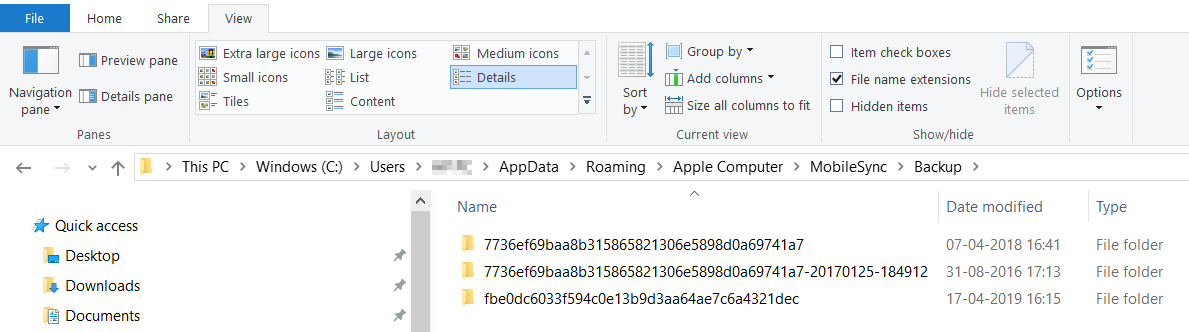
Question: I back up my iPhone to iTunes, but where would I be able to find the pictures, contacts or text messages that are backed up via iTunes on my Windows 10 computer?
This article tells you where to locate an iPhone backup folder created by iTunes on your windows computer.
iTunes saves backups to a Backup folder in your Users folder, and the specific location of the Backup folder varies by different version of operating system.
You got two options to locate the iPhone backup folder in Windows 7, 8 or 10.
1. In the Windows File Explorer, go to \Users\(username)\AppData\Roaming\Apple Computer\MobileSync\Backup\
2. Input %appdata% in the Search bar in Windows 7, 8 or 10 and press enter > double-click these folders: Apple Computer > MobileSync > Backup
Simply locate the path: \Documents and Settings\(username)\Application Data\Apple Computer\MobileSync\Backup\
Article ID: 1029
Created: Wed, Apr 17, 2019
Last Updated: Wed, Apr 17, 2019
Author: Administrator
Online URL: https://www.articlediary.com/article/where-is-iphone-backup-stored-in-windows-1029.html